Integration
To enable androidX add next parameters to yours gradle.properties file:
android.useAndroidX=true
android.enableJetifier=true
android.defaults.buildfeatures.buildconfig=true
android.nonTransitiveRClass=false
android.nonFinalResIds=false
android.enableR8.fullMode=false
Check if you have the necessary settings in the build.gradle (project level) file, if not, please add them:
buildscript {
    repositories {
        google()
        mavenCentral()
        maven { url 'https://maven.google.com/' }
        maven { url "https://plugins.gradle.org/m2/" }
    }
    dependencies {
        classpath 'com.android.tools.build:gradle:8.13.2'
        classpath 'com.google.gms:google-services:4.3.15'
        classpath 'com.google.firebase:firebase-crashlytics-gradle:2.9.9'
    }
}

allprojects {
    repositories {
        google()
        mavenCentral()
        maven { url 'https://maven.google.com/' }
        maven { url 'https://maven.fabric.io/public' }
        maven { url 'https://maven.google.com/' }
        maven { url "https://plugins.gradle.org/m2/" }
        maven { url "https://jitpack.io" }
        maven { url "https://nexus-external.vkteam.ru/repository/vkid-sdk-android/" }
        maven { url "https://nexus-external.vkteam.ru/repository/maven/" }
    }
}
In the file build.gradle (application level) add:
android {
    defaultConfig {
        multiDexEnabled true
    }
    dexOptions {
        javaMaxHeapSize "4g"
    }
}

repositories {
    google()
    maven {
        url 'https://artifactory101xp.jfrog.io/artifactory101xp/p101xp-android-stage/'
        credentials {
            username = "sdk-user"
            password = "Dt!k(5JR&6"
        }
    }
    maven { url 'https://zendesk.jfrog.io/zendesk/repo' }
    maven { url 'https://maven.google.com/'}
    maven { url 'https://jitpack.io' }
    maven { url 'https://android-sdk.is.com/' }
}

dependencies {
    implementation fileTree(include: ['*.jar'], dir: 'libs')

    implementation "androidx.appcompat:appcompat:1.7.1"
    implementation "androidx.multidex:multidex:2.0.1"

    implementation 'com.platform101xp:sdk:4.XX.XX'
    implementation 'com.platform101xp:advertising:4.XX.XX'
    implementation 'com.platform101xp:api:4.XX.XX'
    implementation 'com.platform101xp:authorization:4.XX.XX'
    implementation 'com.platform101xp:base:4.XX.XX'
    implementation 'com.platform101xp:billing:4.XX.XX'
    implementation 'com.platform101xp:utils:4.XX.XX'
}

apply plugin: 'com.google.gms.google-services'
if add implementation 'com.platform101xp:advertising:4.XX.XX' please read Advertising
Editing AndroidManifest.xml
Also, you should edit the AndroidManifest.xml file before using the SDK.
Add the following items to your manifest:
- In <manifest> add:
<uses-permission android:name="android.permission.INTERNET" />
<uses-permission android:name="android.permission.USE_CREDENTIALS" />
<uses-permission android:name="android.permission.ACCESS_NETWORK_STATE" />
<uses-permission android:name="android.permission.WAKE_LOCK" />
<uses-permission android:name="android.permission.VIBRATE" />
<uses-permission android:name="com.google.android.c2dm.permission.RECEIVE" />
- In <application> add:
<application
...
        android:allowBackup="true"
        android:icon="..."
        android:label="@string/app_name"
        android:theme="@style/AppSDKTheme"
        android:name="androidx.multidex.MultiDexApplication">
...
<activity
    android:name="com.platform101xp.authorize.social_networks.activity.InviteActivity"
    android:exported="true" />
Gradle settings for SDK
Please make sure your gradle version is >=8.14.5, compileSdkVersion >= 37, targetSdkVersion >= 37, minSdkVersion >= 24. If your application contains kotlin gradle plugin please set his version >= 2.3.*
distributionUrl=https\://services.gradle.org/distributions/gradle-8.14.5-bin.zip
buildscript {
    ...
    dependencies {
        classpath 'com.android.tools.build:gradle:8.13.2'
        classpath "org.jetbrains.kotlin:kotlin-gradle-plugin:2.3.0"
        ...
    }
}
android {
    ...
    compileSdkVersion 37
    ...
    defaultConfig {
        minSdkVersion 24
        targetSdkVersion 37
    ...
}
google-service
If you want use FireBase Copy google-services.json file to [app folder]
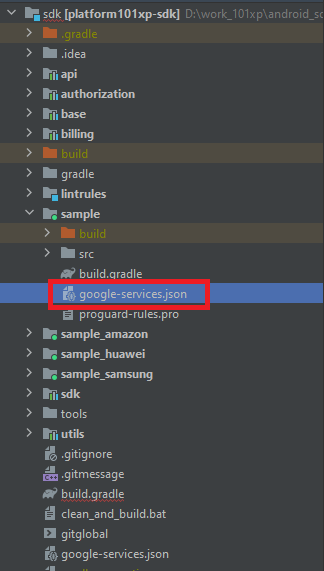
For that file ask your manager.
Build Troubleshooting: Missing manifestPlaceholders
If your Android build fails due to missing manifest placeholders required by the SDK,
you need to provide default or empty values in your app's build.gradle file.
Add the following placeholders inside your defaultConfig block:
android {
    ...
    defaultConfig {
        ...
        manifestPlaceholders["cpSdkHost"] = "paymentsdk.sdk.platform101xp.com"
        manifestPlaceholders["YANDEX_CLIENT_ID"] = ""
        manifestPlaceholders["VKIDClientID"] = ""
        manifestPlaceholders["VKIDClientSecret"] = ""
        manifestPlaceholders["VKIDRedirectHost"] = ""
        manifestPlaceholders["VKIDRedirectScheme"] = ""
    }
}
Note: If you use specific integrations (such as Yandex or VK ID), make sure to replace these empty strings with your actual project credentials provided by the respective platforms.